
Mobile Friendly BNI Connect1.4.0 - Google Play
You'll be able to see results in few seconds.
Publisher Description
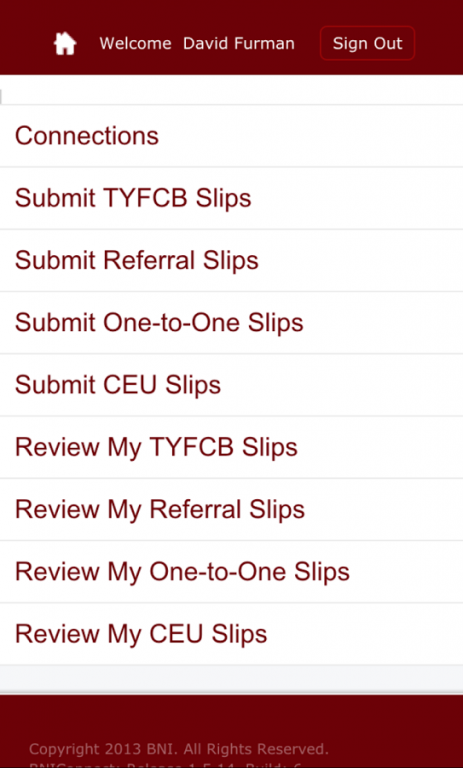
I've found that the times I need to submit referrals to fellow BNI members or keep track of closed business and one-to-ones, I am usually away from the office. Unfortunately, the BNI connect website is next to impossible to use from a mobile device and the existing apps for BNI do not provide these basics. I wrote this app to fill the needs for myself and other members of my BNI chapter. Please feel free to use it, and let me know if you find any issues. The pages within the app are pulling directly from the BNI Connect website, so you will have to be connected to the internet to use the app.
Here are the features I focused on, which I felt were the most important for a mobile experience:
* Remembering Login Info, so you are only asked once unless you decide to sign out.
* Viewing Chapter Connections - Including easily sending emails and calling members.
* Submitting TYFCB Slips
* Submitting Referral Slips
* Submitting One-to-One Slips
About Mobile Friendly BNI Connect
The company that develops Mobile Friendly BNI Connect is David Furman. The latest version released by its developer is 1.4.0.
To install Mobile Friendly BNI Connect on your Android device, just click the green Continue To App button above to start the installation process. The app is listed on our website since 2016-03-06 and was downloaded 0 times. We have already checked if the download link is safe, however for your own protection we recommend that you scan the downloaded app with your antivirus. Your antivirus may detect the Mobile Friendly BNI Connect as malware if the download link to com.eliasart.bni is broken.
How to install Mobile Friendly BNI Connect on your Android device:
- Click on the Continue To App button on our website. This will redirect you to Google Play.
- Once the Mobile Friendly BNI Connect is shown in the Google Play listing of your Android device, you can start its download and installation. Tap on the Install button located below the search bar and to the right of the app icon.
- A pop-up window with the permissions required by Mobile Friendly BNI Connect will be shown. Click on Accept to continue the process.
- Mobile Friendly BNI Connect will be downloaded onto your device, displaying a progress. Once the download completes, the installation will start and you'll get a notification after the installation is finished.
Program Details
System requirements
Download information
Pricing
Version History
version 1.4.0
posted on 2016-03-06
Fixes a sign in issue that started after a recent change to BNIConnectGlobal.com. The app no longer tries to auto sign in, instead allowing you to either change your login info or tap the Sign In button.
Disclaimer
Official Google Play Link
We do not host Mobile Friendly BNI Connect on our servers. We did not scan it for viruses, adware, spyware or other type of malware. This app is hosted by Google and passed their terms and conditions to be listed there. We recommend caution when installing it.
The Google Play link for Mobile Friendly BNI Connect is provided to you by apps112.com without any warranties, representations or guarantees of any kind, so access it at your own risk.
If you have questions regarding this particular app contact the publisher directly. For questions about the functionalities of apps112.com contact us.
